

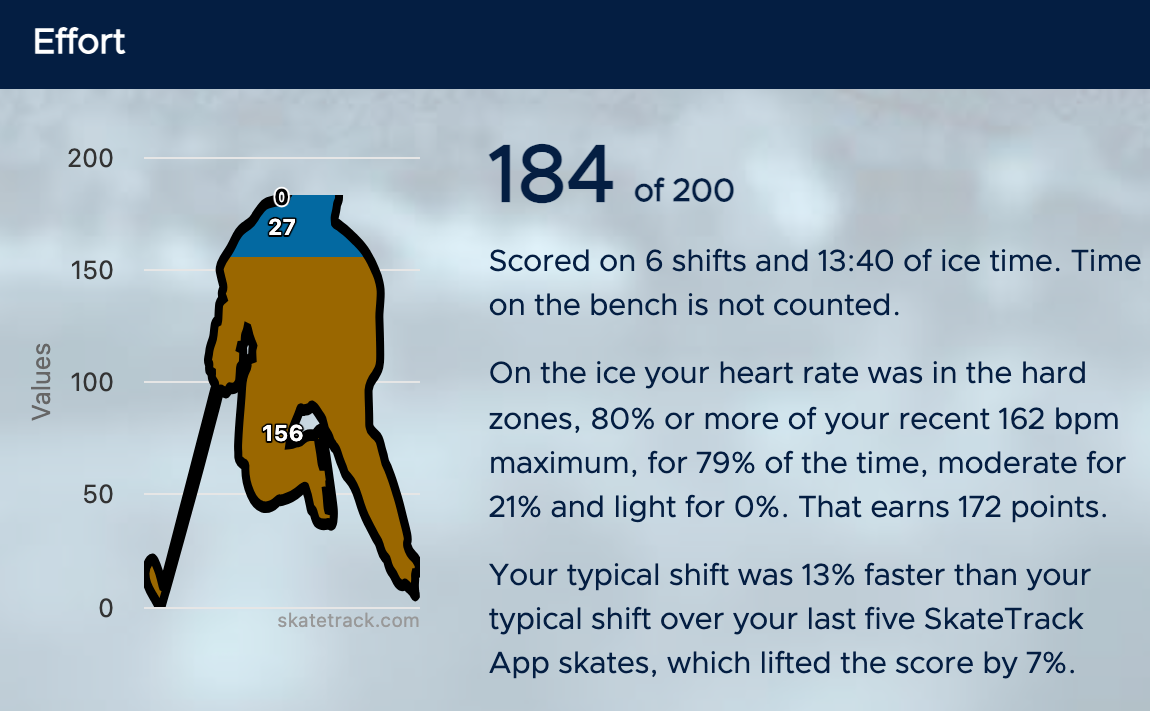
Every skate you record on SkateTrack gets an effort score: a number from 0 to 200, drawn on the skate page as a skater silhouette that fills from the feet up. The fuller the figure, the harder you worked while you were on the ice. This page explains in plain terms what goes into that number, what it leaves out, and what you can do to push it higher from one skate to the next.
- The idea in one sentence
- Why the bench does not count
- What goes into the score
- Reading your score
- It is you against you
- How to raise your score
- When the score looks off
- In short
1. The idea in one sentence
Effort measures how hard you skated during your shifts, judged against your own recent skates. That is the whole idea. It is not how long you played, not how many shifts you took, and not how you compare with anyone else on the ice.
Think of it as the answer to the question you get on the drive home: when you were out there, did you go?
2. Why the bench does not count
A hockey game is mostly sitting down. On a deep bench you might play twelve minutes of a sixty-minute game; on a short bench, twenty-five. If effort were measured over the whole hour, the skater on the deep bench would be marked down for the roster, not for anything they did on the ice.
So SkateTrack looks only at your shifts. Whatever your heart does between them, whether you are catching your breath or chatting at the door, is ignored. It cannot help your score and it cannot hurt it. A skater who plays three shifts flat out scores the same as one who plays twelve shifts flat out.
Practices, stick times and open skates have no shifts, so for those the whole session counts as ice time.
3. What goes into the score
Two things: how hard your heart was working while you were on the ice, and how much ice you covered while you were out there.
Your heart rate on the ice
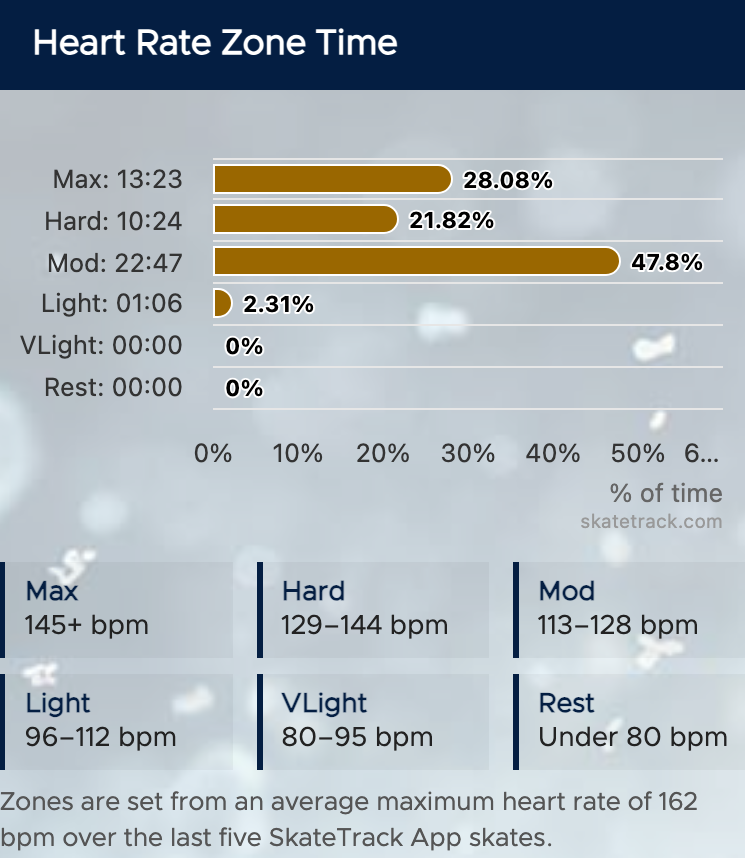
Every heart rate reading your device takes during a shift is sorted into one of six zones, from Rest at the bottom through Very light, Light, Moderate and Hard to Max at the top (the chart shortens two of them to VLight and Mod). The higher the zone, the more it adds to your score. Time spent at Rest adds nothing at all.
The zones are not fixed numbers from a chart on the gym wall. They are cut from your own maximum heart rate, averaged over your five most recent skates, so they move with your fitness and they mean the same thing whether you are 20 or 55. Your skate page lists the heart rate range of each zone and says which skates set them.
Put simply: the more of your ice time you spend in the upper zones, the higher your score.
Your pace on the ice
Two skaters can have the same heart rate and be doing very different amounts of work. If you covered more ice than usual in shifts of the same length, you were skating harder, and the score should say so.
For every shift, SkateTrack looks at how far you skated against how long the shift lasted. It takes your typical shift for the night and compares it with your typical shift over your five most recent skates. Quicker than usual nudges your heart rate score up; slower nudges it down. The nudge is deliberately gentle. Heart rate is the main measure, and pace is there to tell apart two skates that heart rate alone cannot.
Why your typical shift rather than your whole night? Trackers are sometimes left running after the final buzzer, and a long stretch of sitting looks like one very long, very slow shift. By going on the shift in the middle of your night, one odd shift, long or short, fast or slow, cannot drag the whole score down with it.
4. Reading your score
The score tops out at 200. Reaching it means every second of every shift was spent at or near your recent maximum heart rate, at your usual pace or better. Most hard games land somewhere between 140 and 190. If you see 200, you had nothing left to give.
Along with the silhouette, your skate page splits the score into three bands so you can see where it came from:
- Hard: points earned in the Max and Hard zones.
- Moderate: points earned in the Moderate and Light zones.
- Light: points earned in the Very light and Rest zones.
The three bands add up to your score. A tall Hard band and a sliver of Light is the shape of a night you emptied the tank.
5. It is you against you
Both yardsticks, the zones and the pace, are set by your own last five skates. The score is not a comparison with your linemates, and it is not meant to be. A 170 means you skated close to the top of what you have shown lately, whoever you are and whatever shape you are in.
That has a side effect worth knowing about. As you get fitter, your usual pace rises and your zones rise with it, so the same effort scores a little lower than it did when you were less fit. That is the point. The score measures how hard you pushed, not how good you are. If your number holds steady while your pace climbs, you are getting better and still working just as hard.
The five skates are always from the same device, because devices measure differently, distance especially. A skate from your Apple Watch is compared only with your last five Apple Watch skates, a Google Health skate with your last five of those, and a HockeyTracker skate with your last five HockeyTracker skates. The skate page tells you which device's skates set the bar. If you wear more than one, each has its own zones and its own usual pace, so pace numbers should not be compared across devices.
6. How to raise your score
Because the score is built from your shifts and judged against your recent self, the way to raise it is not to play more. It is to make each shift count. Here is what moves the number.
Go hard, then sit
Bench time is free. Nothing you do there changes the score, so use it well: catch your breath properly, then skate the next shift like it is your last of the night. Six all-out shifts will beat twelve where you coast through half of each. If your bench allows it, change more often and go harder when you are out.
Cut the coasting
Pace is measured shift by shift, so the stretches where you glide and wait for the play to come to you pull your typical shift down. Skate to the puck, finish your back-check, keep your feet moving through the neutral zone. You do not need to sprint the whole shift. You need fewer moments standing still.
Warm up before your first shift
Your first shift counts the same as your last. Step on the ice cold and that shift is spent getting up to speed instead of in the zones that score. A few minutes of real warm-up, on the ice or in the hallway, means shift one starts where shift three otherwise would.
Finish the third period
Late shifts count the same as early ones, and the last ten minutes of a game are where a lot of scores are lost. If you can keep the final shifts of the night close to the pace of the first, your typical shift stays up and the score follows.
Start and stop the recording at the ice
In a game, a tracker left running after the buzzer will not swing your score, but it is still noise you do not need. In a practice or stick time, where the whole session counts, the minutes spent recording while you unlace your skates lower the score outright. Start the workout when you step on and stop it when you step off.
Wear the watch snug, and stick with it
A loose watch drops heart rate readings. Time with no readings is left out of the score rather than counted against you, but the less your watch sees, the less of your effort it can give you credit for. Keep it snug and under the cuff of your glove. And if you own more than one device, wearing the same one skate after skate gives SkateTrack a steady baseline to compare you with.
Build the engine between skates
The score rewards time in your top zones and a quicker typical shift, and both come from fitness. Short, hard intervals, a shift's worth of work followed by a shift's worth of rest, on a bike, a rower or a track are the closest off-ice match to hockey. Legs that recover faster on the bench are legs that go harder on the next shift. Sleep and water the night before do not hurt either.
Chase your recent best, not 200
A 200 is a night with nothing left in you. It is not a target for every Tuesday. A better goal is to beat your last few skates, or to watch the Light band shrink and the Hard band grow. And because the bar rises as you improve, holding a high score over months is itself a sign you are getting better.
7. When the score looks off
- Your first few skates with a device. SkateTrack compares you with your last five skates on that device. Until it has five, it uses what it has, and on your very first skate it has only that skate, so pace neither helps nor hurts. Give it a few skates to learn your baseline.
- No distance. Goalies, and some devices, record no distance. The pace nudge is skipped and the score is your heart rate alone.
- Practices and stick times. No shifts, so the whole session counts, water breaks and standing around included. A practice with a lot of waiting will score lower than a game. That is the format, not you.
- A dropped heart rate signal. Time with no readings is left out. It neither adds to nor takes from your score.
- A new device. Switching from a watch to a HockeyTracker, or the other way, starts a fresh set of comparisons. The scores are still fair, but do not read the pace numbers across devices as one series.
8. In short
- Only your shifts count. Bench time is ignored.
- The harder your heart works during shifts, the more points you earn. The zones are cut from your own recent skates, on the same device.
- Skating quicker than your usual shift nudges the score up; slower nudges it down.
- The result runs from 0 to 200, where 200 is everything you had.
- To raise it: go hard every shift, cut the coasting, warm up, finish the third, and let the bench do its job.
New to SkateTrack? Getting Started walks through setting up your account and recording your first skate.